
By the LinkDrop team.
In one line
Tell your agent "send this PDF to Priya", and it comes back with a tracked link. Ask it next week "did she read it?", and it tells you which pages she read and for how long.
LinkDrop is built for that loop. It connects to your AI client over MCP, the standard way agents use outside tools, and it gives the agent the same controls you have in the app. You review what it did on lnkdrp.com.
The loop end to end, recorded in a real Claude Code session on 20 October 2026 on a test workspace, narrated with a synthetic voice and word-by-word captions. Waits are sped up and marked. Watch on YouTube
Who this is for
People who already do their work through an AI client, and send PDFs as part of it:
- a founder who drafts the investor update with Claude and wants to know who opened it;
- an engineer whose build produces a report PDF for a customer;
- an account manager who keeps proposals in Google Drive and works in ChatGPT;
- anyone who has typed "attach this and send it" and then wondered if it was read.
What your agent can do
Once connected, the agent can:
- Share a PDF from your Google Drive, a public web link, a file on the computer it runs on, or a file attached in ChatGPT, and return the link, with an optional password, expiry and download setting. When it cannot send the file itself, as on claude.ai, it gives you an upload link to finish in your browser.
- Make one link per recipient, each with a private label and its own analytics.
- Group documents into a project and send one link for the whole set.
- Replace a PDF with a new version. Every link keeps its address and its history. A document that came from Google Drive can be updated from the Drive file; if nothing changed, nothing is created and no credits are used.
- Read the numbers: views, readers, downloads, pages and time per page, for a document or a single link, on every plan.
- Read the visit briefs LinkDrop writes after a visit, and write one for a visit that has none (this uses credits).
- Tell you what needs you, such as a download request, and approve or deny it after you confirm in your client.
- Turn a link off, archive a document, or restore one deleted in the last 30 days.
- Say which workspace it is working in, with its plan and credits.
The full list is on Connect your agent.
Which clients
ChatGPT, Claude (claude.ai and the Claude app), Claude Code, Cursor, Codex, Gemini CLI and Cowork connect by signing in: you add LinkDrop's server address, sign in in your browser, pick a workspace and click Allow. No key is copied anywhere.
Grok and scripts use an API key instead. Any other MCP client works with the same server address, https://mcp.lnkdrp.com/mcp. The quickest start is the Agents page in the app, which shows the exact command or settings for your client and workspace. Step-by-step pages for each client are on the MCP setup page; for the terminal, see how to send a PDF from Claude Code.
A prompt to start with
Find the Q3 board deck in my Google Drive. Share it with each of our four board members, one link each, labelled with their names. Password-protect them and turn off downloads. Then give me the links.
And a week later:
Who has opened the board deck? Who has not? For anyone who read it, which pages did they spend the most time on?
 Asked in plain words, Claude Code uploads the deck, makes a link labelled for Priya and hands it back with its password. Recorded in a real Claude Code session on 20 October 2026 on a LinkDrop test workspace whose connection is named LinkDrop-Reviewer; yours is LinkDrop. Shown at twice the real speed. Tap to enlarge.
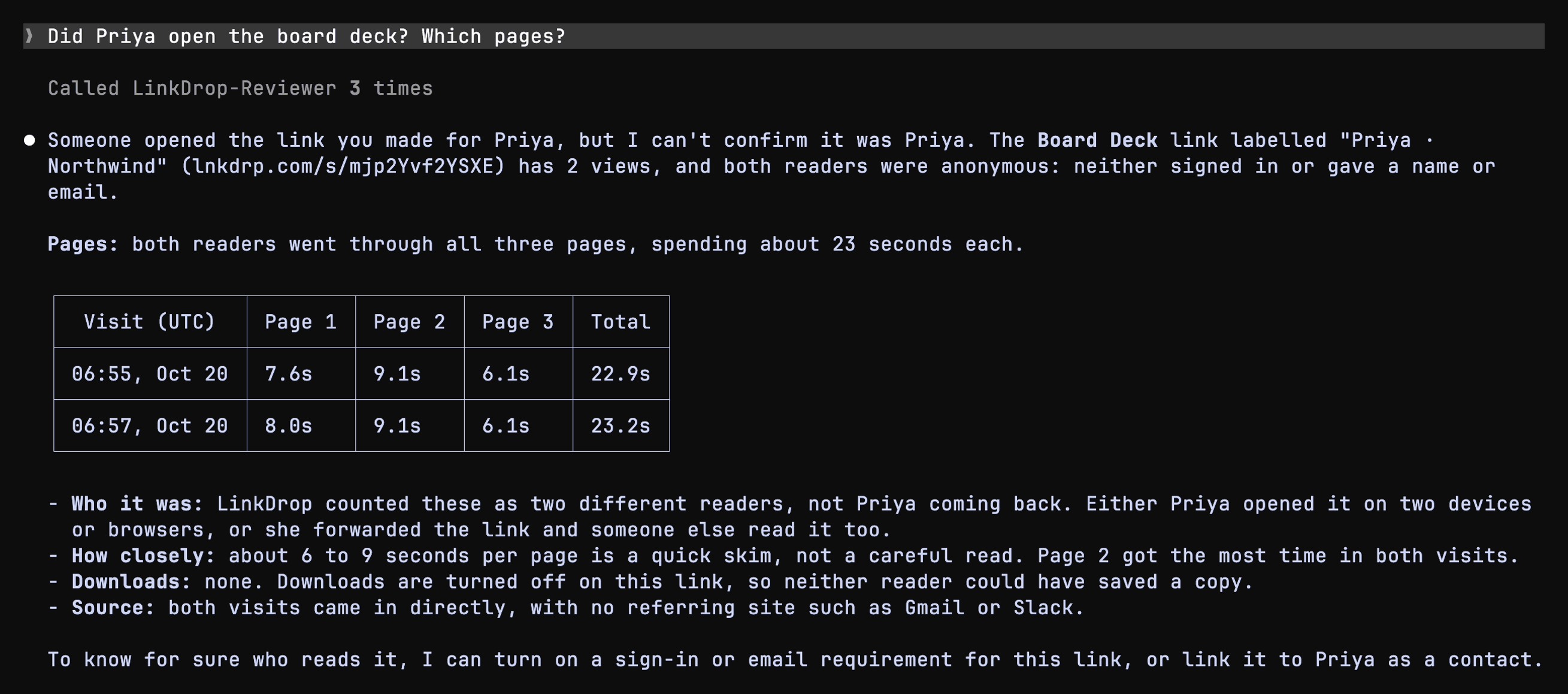 Asked who read it, Claude Code answers from LinkDrop: two anonymous views on Priya's link, with time on each page. These were the recording's own short test visits. Tap to enlarge.
 Replace on the same link: the address Priya already has now shows version 2, and version 1 stays in history. Recorded in a real Claude Code session on 20 October 2026 on a LinkDrop test workspace whose connection is named LinkDrop-Reviewer; yours is LinkDrop. Shown at twice the real speed. Tap to enlarge.
The agent answers from LinkDrop's records. Readers who were signed in or introduced themselves are named; with one link per person, the link label names the rest.
Safe by default
Agents make mistakes. LinkDrop is built so the costly ones need you:
- Deletes ask first. Before an agent deletes a link, a document or a project, LinkDrop asks you and shows what would be affected, such as how many people opened the link. If your client cannot show that prompt, the agent must show you the same details and get your yes in the chat. A deleted document can be restored, file and links included, for 30 days.
- Archiving asks only when someone already opened the document. Archiving is reversible and keeps the analytics.
- You decide what stops asking. On a connection's page you can choose Always allow for a delete or an archive, so that connection stops asking for it. Deciding a download request always asks and cannot be always-allowed.
- Some things stay with you. Billing, keys, your sign-in email and who is in the workspace can only be changed in the app. On Pro, an agent can ask for a teammate to be invited, and nobody joins until an owner or admin approves.
- Everything is on the record. The activity feed attributes each action to the client that did it, such as "Claude Code created a link". You can revoke any agent you connected on the Agents page, owners and admins can revoke anyone's, and it stops at once.
- Readers' words are data. Titles, summaries and anything a reader types reach the agent marked as content written by others, not as instructions.
 The agent cannot delete on its own: LinkDrop shows its prompt inside Claude Code, naming what will stop working, and the deck stays restorable for 30 days. Recorded in a real Claude Code session on 20 October 2026 on a LinkDrop test workspace whose connection is named LinkDrop-Reviewer; yours is LinkDrop. Shown at twice the real speed. Tap to enlarge.
Why not just let the agent attach the file?
An attachment cannot tell anyone whether it was read. It cannot be changed after it is sent, and it cannot be taken back. A link can do all three. See email attachments vs tracked links.
How it fits your plan
Connecting agents is free and works on every plan. Agents never take a seat; they work under your plan's limits and credits.
- Free: 10 shared documents, 2 projects, and 100 credits to start, once. A Free workspace is single-user.
- Pro: unlimited documents and projects, 500 credits a month, and up to 3 teammates who can upload and share.
Uploads, links and analytics never cost credits. Summaries, version compares, visit briefs and reader profiles do. See Pricing and what credits cost.
Related
- Fundraising: send a deck and know who read it
- A team sales deck: a link per prospect, every change reviewed
- Activity: the audit trail of what agents did